CBZ, CBR and PDF
CBR and PDF are converted to CBZ on entry. No system unrar, no PDF binaries. Large PDFs are read from disk, not memory. Existing ComicInfo.xml is preserved.
Comic archive management · macOS
Taneleer converts your comics to CBZ, matches each issue against ComicVine, and files it where Komga expects to find it.
v1.1.0 · Apple Silicon and Intel · free
What it does
Point Taneleer at the collection you already have. It reads, converts and proposes. You confirm. Nothing is written to your source files, ever.
CBR and PDF are converted to CBZ on entry. No system unrar, no PDF binaries. Large PDFs are read from disk, not memory. Existing ComicInfo.xml is preserved.
Candidates are ranked on series, issue, volume, year and a cover fingerprint, and shown with the publisher, volume and issue count that tell relaunches apart.
Empty fields are filled. Existing values change only where you tick them. Your data is trusted until you say otherwise.
Choose a preset or write your own: {Series}/{Series} #{Number} ({Year}).cbz, with a live preview.
Manual, Assisted or Aggressive, with a tunable threshold. Files with existing metadata are never applied silently.
A scan is triggered on Komga after every confirmation. Optional watch mode rescans the source library for you.
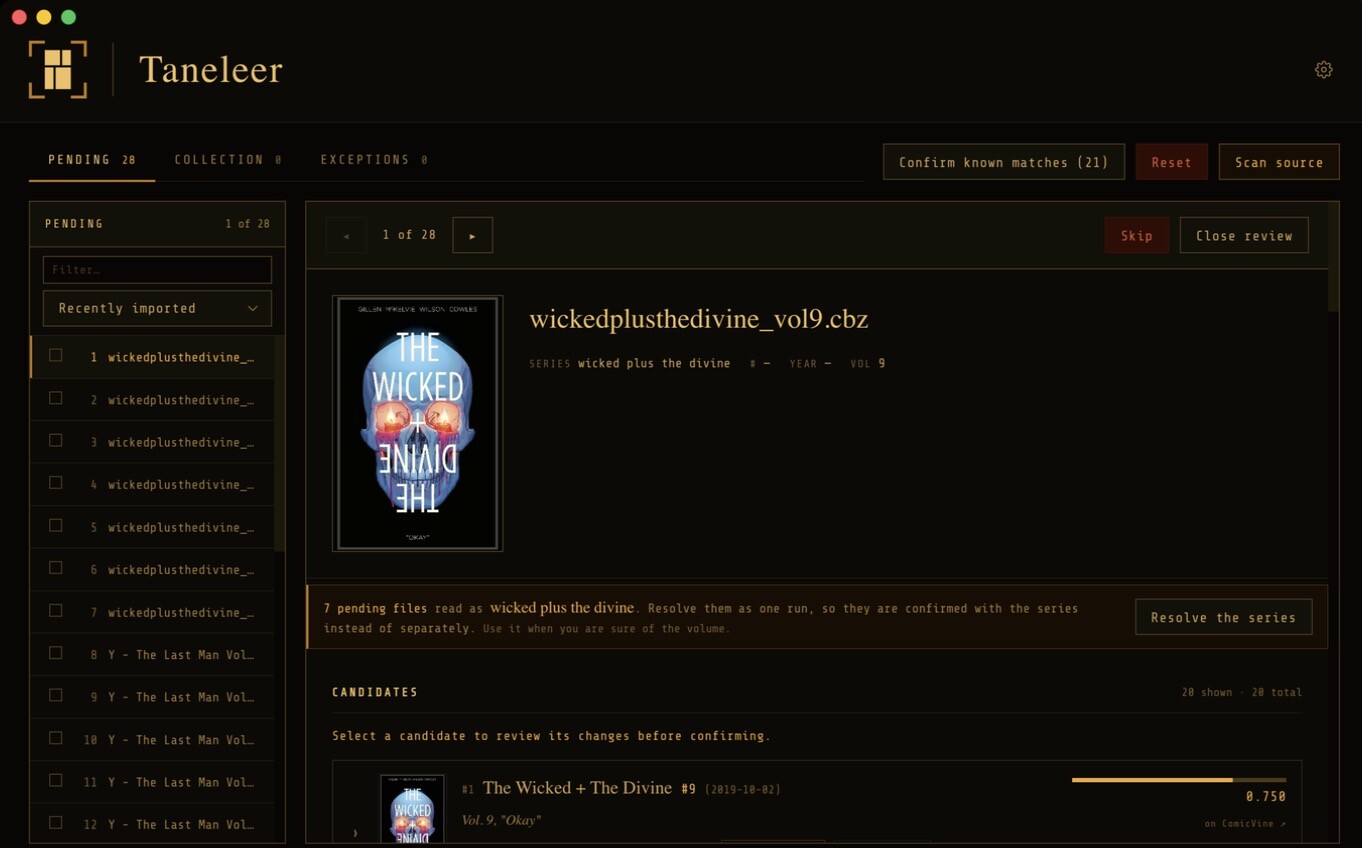
When one volume matches many files, Taneleer pairs each file with its issue and confirms them together, showing which pairings need a look.
Files already carrying a ComicVine ID are checked and confirmed in bulk. Missing publisher and volume details on confirmed files are filled in.
Confirmed a batch in error? One button puts all of its files back in pending, exactly as they were. Any file you have changed since is left as it is, and you are told which.
The matching
Every issue is read carefully, ranked in two passes, and verified against its cover. The working is always shown, so a confident match and a lucky one are never confused.
Year, volume and issue number are extracted from any common pattern. trees001 becomes series trees, issue 1. Jammed names such as seventoeternity are word-segmented before ComicVine is asked. A collected edition named for its volume, such as wickedplusthedivine_vol3, is paired with issue 3 of that volume.
Series names are compared by token similarity, ignoring case and diacritics, with & and + read as and and plus. The issue number must match exactly; where a file has none, as with collected editions, the volume tag and year count for more. An undated foreign reprint ranks below the original.
The leading candidates have their covers fingerprinted and compared to your file’s cover, by perceptual hash. It raises confidence; it never disqualifies, because variant covers are common and a different cover is not a wrong issue. Each candidate is labelled matches, similar, differs or not checked. The same fingerprints also find visual duplicates across your collection.
Each candidate carries its score, a per-signal breakdown, and the publisher, start year and issue count of its volume, so you can see precisely why it ranks where it does and which run of a title it belongs to.
How a score is made · file with an issue number
Collected edition, no issue number
Where the filename is hopeless, you teach Taneleer once. Aliases fold your own naming to a canonical series by prefix or regex. Resolve a run pairs every pending file of a series with its volume in one step, so a long series costs one decision, not twenty.
Why Taneleer
Tagging tools tend to ask for faith. Taneleer asks for a decision, and gives you what you need to make it.
The method
Taneleer walks the source library and converts new files into a pending queue, live.
Each file shows its cover, parsed filename and ranked ComicVine candidates.
See exactly which fields fill and which differ. Confirm, and the next file appears.
The file is written to the output library at its template path. Komga reads it from there.
Safe by construction
Two directories, one pipeline. The source is never modified or deleted from. Taneleer produces its output elsewhere, and the output is always a valid input, so a round trip is safe.
Every file carries one of four statuses. Nothing is called Confirmed without a ComicVine match, and every state change is shown twice: on the item and in the tab counts.
Duplicates are found by cover fingerprint. Jammed filenames such as seventoeternity are folded to their series by alias rules. Re-enrichment of a confirmed file is always a manual act.
Support
Taneleer is free, and made by one person. If it has put your collection in order, a contribution on Ko-fi funds further maintenance. It is entirely optional.
Download
Open the DMG, drag Taneleer into Applications, and begin. First launch walks you through setup.
Prefer the release notes? View the release page. You will also need a free ComicVine API key. Windows is not available at v1.